
R
River Notes
@river_notes
@river_notes
The library has opened its map collection for the weekend. Bring a photograph of your street if you have one.
Reply Share STOP SLOP
Spot likely AI writing as you scroll. Use one slider to review, mark, collapse or hide it. Keep the posts and people you choose.
Available on the Chrome Web Store.
X, LinkedIn, Reddit and opened articles.
5,000 free AI checks each month.
No key needed to start. No STOP SLOP subscription.
New posts get checked as you scroll. Move from Review to Mark, Collapse or Hide without changing the detection threshold.
Local signals and DeepSeek cloud checks look for converging writing patterns. Uncertain results do not trigger AI-writing filtering.
Show a flagged post or restore hidden posts from the popup. X account exceptions also skip cloud checks.
A shared 30-day cache reuses results for matching text. Cloud checks send visible text through STOP SLOP and OpenRouter. Turn them off in Settings.
Open the popup and choose how to display flagged writing. The slider changes presentation, not the detection threshold. Mark is the default.
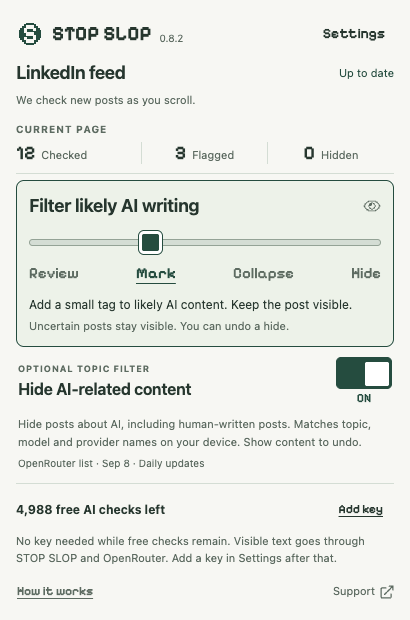
Unknown results do not trigger AI-writing filtering. Your topic and community filters apply separately. A Show choice lasts for the current page session. Visit totals keep the posts you have checked in the count as you scroll.
Try the controls below. You can show a filtered post whenever you want.
The library has opened its map collection for the weekend. Bring a photograph of your street if you have one.
Reply ShareThis is an illustrative post. A Likely AI tag represents a fallible estimate, and you can keep the post visible.
The extension combines local writing signals with optional cloud checks. Open a tag to see the reasons. It cannot prove who wrote a post.
I found my grandfather’s pencil marks under the table. We repaired the joint and put it back in the kitchen.
Always show this accountTry “Show content.” This website illustration shows Collapse mode. The extension starts in Mark mode.
The main screen has a separate Hide AI-related content On/Off switch. Use it to fold AI discussion, including posts written by humans.
Local keyword matching covers AI topics, tools and technical terms across 54 languages. This filters the subject of a post; it does not estimate who wrote it.
The bundled OpenRouter catalog includes model and publisher names as separate terms, such as Gemini, Google and Astra. The extension checks for catalog updates once a day and keeps the last working list.
Names can have other meanings. Choose Show content to restore a match, or allow an X account. Topic matching runs on your device and skips automatic cloud review for matching posts.
Your installation includes a monthly cloud allowance. View usage in the popup or Settings. STOP SLOP does not charge a subscription.
Supported feeds use DeepSeek through our Cloudflare service and OpenRouter. The allowance resets each calendar month in UTC. A fresh attempt can count even if it fails or returns Unknown.
Cached results cost no monthly checks. We reuse matching results for 30 days and combine simultaneous duplicate requests. We store text hashes and results, not raw posts.
After the free allowance runs out, add an OpenRouter key to continue using your own credits. Local filters keep working without it. Provider limits or shared service limits can pause free checks before you reach 5,000.
A cloud outage does not trigger paid fallback. Your personal key stays in the browser session and clears when you close the browser or reload the extension. Follow the key setup guide.
Keep everyday filtering on the main screen. Open Settings for scanning and exceptions, then Advanced settings for community lists, image review and contributions.
Use Settings → Pause scanning to stop checks, or turn Cloud checks off to keep detection on your device. Articles start with local checks. Under Article website permissions, enable cloud for the exact website you want to share, or remove a previous permission.
Cloud checks send eligible visible text through STOP SLOP and OpenRouter. Keep private workspaces local. Read the data and retention details.
Add an X handle under Settings → Account exceptions, or use the account control on a post. This skips AI checks and overrides AI, topic and community filters for that handle in your browser. Remove an exception if an account changes hands.
For more context, open the X profile review control and preview up to 10 loaded posts. Scroll the profile, then refresh the sample. Sending a sample requires your personal key and at least 80 words of eligible English text. The extension does not fetch unloaded history or send the profile biography.
The extension includes a starter list without requiring an import. It currently has zero reviewed rules and hides nothing. If you removed it, choose Restore starter list in Advanced settings → Community lists.
Import a reviewed JSON file or subscribe to a trusted HTTPS publisher for daily updates. Choose Hide with an undo control, Show the evidence, or Off. Rules match exact text fingerprints, not all posts by an account. You can manage lists and clear your always-show exceptions here. Inspect the published list and sources.
Bundled starter updates arrive with extension releases. Imported files do not auto-update. Removed or disabled lists stay that way until you choose otherwise.
Choose Review on the slider to show controls on unflagged posts. Open a post’s review controls and inspect the text preview before sending it through OpenRouter. Choose OpenRouter Auto or DeepSeek V4 Flash Latest under Settings → Add OpenRouter key → Personal key model and spending limit. Automatic checks use DeepSeek regardless of this manual choice.
Manual text reviews require eligible English text of at least 80 words and send up to 12,000 characters. Automatic personal checks, manual text reviews and image reviews share a session limit of 20 attempts by default, adjustable from 1 to 100. These reviews use your OpenRouter credits. Quota and rate-limit errors pause personal checks.
Open Advanced settings → Image review. Choose a JPEG, PNG or static WebP file, up to 12 MiB and 24 megapixels. Inspect the resized preview, then choose Review image with DeepSeek to send it using your personal key. Feed images do not receive automatic visual review.
DeepSeek Vision returns Likely AI-generated, No clear AI signs, or Uncertain, with an explanation and observations. On your device, we also look for embedded C2PA Content Credentials in the original file. We do not validate their cryptographic signatures or detect invisible watermarks. Missing credentials do not establish human authorship.
The preview removes the filename and EXIF metadata and limits the longest edge to 1,024 pixels. Visible personal information remains in the image.
In Advanced settings, choose Contribute an example for research. Add text you have permission to share, its language, your authorship claim and creation evidence. Confirm redistribution rights, preview the file and download it. Exporting uploads nothing; your claim stays separate from a reviewed training label.
Post review controls also let you download a rule or correction proposal with evidence. Share it through the maintainer’s review process. Votes and model opinions alone do not establish authorship.
Under Advanced settings → Local model research, import a candidate JSON file up to 1 MiB and enable observations on your device. Refresh, export or reset the session measurements, or remove the candidate.
Observation-only candidates cannot hide posts or skip actual API calls. Measurements cover observation events, inference timings and estimated weight memory; they do not establish accuracy or safe API savings. These experiments upload no observations. We have no validated training corpus or real-world accuracy result to advertise.
You do not need an OpenRouter key for the included free checks. Add one when your monthly allowance runs out, or to use manual text and image reviews.
Get STOP SLOP from the Chrome Web Store and pin it to your toolbar. Refresh existing feed tabs after installing or updating. Open an X, LinkedIn or Reddit feed, or a publisher’s article. Choose your display mode in the popup.
Open OpenRouter key settings, sign in and create a key named STOP SLOP. Set a credit limit if you want a spending cap. Paid models need OpenRouter credits.
Open Settings → Add OpenRouter key → Enter your key. Paste it into OpenRouter API key and choose Save settings. Keep the key private. Re-enter it after closing the browser or reloading the extension.
No. Writing patterns, community matches and model opinions can be wrong. STOP SLOP keeps uncertainty visible and gives you filtering choices. We have no validated AI-authorship accuracy claim.
You get 5,000 free fresh AI checks per browser installation each calendar month (UTC). Cached results are free. After that, follow the OpenRouter key guide in Settings to continue with your own credits. Local filters keep working.
Cloud checks start enabled for supported feeds and send eligible visible text, up to 8,000 characters, through our Cloudflare service and OpenRouter. Article checks start locally; enable cloud for each article website in Settings. We cache hashes and results for 30 days without persisting raw text. Turn cloud checks off in Settings to keep scanning local. Read our privacy policy for details.
The extension scans supported X, LinkedIn and Reddit posts and opened articles, including publisher pages reached from Google Search or News. It skips recognized messaging pages. Opened articles need a supported article container and at least 80 words. Medium and Substack articles can qualify. Search snippets, media-only posts, unloaded history and inaccessible paywall text do not receive automatic text review. Short or ambiguous content may remain Unknown. Account exceptions and profile samples support X.
Install STOP SLOP from the Chrome Web Store. Choose Add to Chrome, confirm the permissions, then pin STOP SLOP to your toolbar.
After an extension update, reload it at chrome://extensions and refresh the feed tab. Make sure Pause scanning is off and you are on a supported feed or article, not a messaging or utility page. Newly changed platform layouts can affect extraction.
Cloud paused can mean a provider, rate or shared service limit. Check the status and retry time in Settings; local checks continue. Adding a personal key enables automatic paid checks after monthly allowance exhaustion, not as a workaround for a service outage. Send us the status and a screenshot if scanning still fails.